Anyone on the Internet Can Ring Your Doorbell
Updates#
2026-05-06. I opened a coordination case with CERT/CC’s VINCE covering the findings below. CVE assignment will go through that process.
2026-05-07. Naxclow contacted me one day after this post went live, acknowledged the report, and started their internal review process.
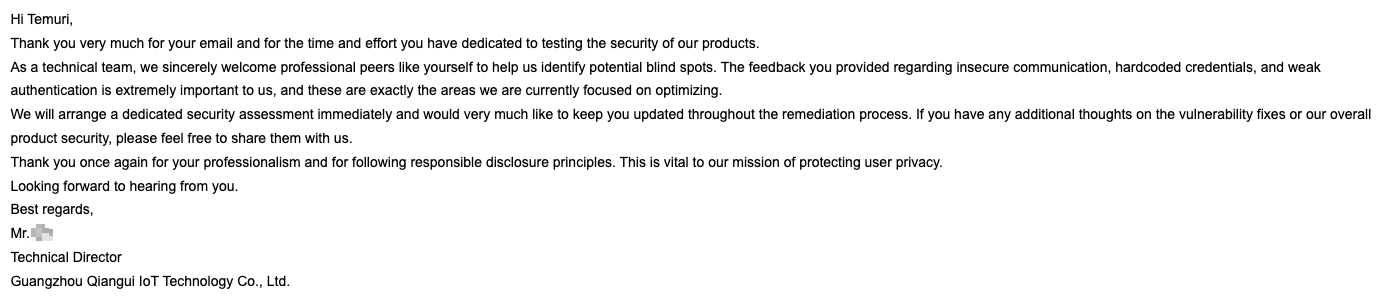
Naxclow’s reply, the day after publication.
2026-06-11. CISA published advisory ICSA-26-162-02 for the Naxclow IoT Platform, assigning seven CVEs from the VINCE case. Naxclow did not respond to CISA.
Recently I bought a smart doorbell off Temu, the Chinese marketplace that has been gaining popularity worldwide over the past couple of years. I wanted to know how secure the cheap connected hardware sold on that platform actually is. The unit ships under the name “Smart Doorbell X3” and pairs through a mobile app called “X Smart Home”. Camera, microphone, two-way audio, sub-GHz indoor receiver. The kind of gear that has quietly shown up on a lot of front doors.
By the end of a few weekends with one I could:
- silently steal any of these doorbells off its owner’s account
- impersonate the device on a live call, with attacker-chosen video on the owner’s phone
- lift the home WiFi password through a debug port behind a screwdriver
$12 on the front. Whole-network compromise on the back. The first of those takes a free account on the platform, and redirects every real call from the door to my phone instead of the owner’s. The second takes nothing at all, and invents new calls into the owner’s phone with whatever video I want. The real doorbell stays online either way and never knows. You are basically paying $12 to let anyone on the internet ring your doorbell.
The findings sit at the platform layer of the backend, not in any one box on a Temu listing. The doorbell talks to a backend operated under the brand Naxclow, by a Guangzhou-based company called Guangzhou Qiangui IoT Technology Co., Ltd. The same hardware ships rebadged under several reseller brands, and the same provider runs a small family of consumer apps under Naxclow, each on its own subdomain. V720 is one (publicly reverse-engineered already, see intx82/a9-v720). A sibling app called “ix cam” is the other I noticed. I did not separately test either of them. Their web frontends share the same Vue scaffolding as X Smart Home, and that public work already covers the wire-protocol overlap between V720 and the doorbell. The shared SPA codebase plus the protocol overlap suggest the same backend code is running under each branded hostname. This is a story about a platform, not a box.
This blog is part of a sanitized responsible disclosure. Finding contact info for Naxclow was not easy. They have no contact page on their website. I eventually found an email address on one of their pages, and brute-forced common alias names on the same domain to widen the net. Most of those bounced. On April 29, 2026 I sent the report through the addresses that delivered, and through the X Smart Home in-app feedback form. As of writing I have not received a reply. I am publishing one week after the notification, with sensitive specifics stripped out.
The list of issues is long, so grab your favorite snack or drink and settle in.
Scope and Ethics#
I tested everything below on devices I own, with two of my own X Smart Home accounts. The traffic touched Naxclow’s production backend, but only under my own credentials. I never touched anyone else’s account, device, or traffic.
Real endpoint paths, exact parameter names, the literal hardcoded salt, the full signing implementation, and any working PoC code stay out of this post. The point is the methodology and the failure modes, not a recipe.
The Device#
Three pieces:
- the doorbell: camera, push button, mic, speaker, WiFi, sub-GHz transmitter
- a small indoor receiver that listens on sub-GHz and rings a tone when the button is pressed
- a mobile companion app for live view, two-way audio, and event history
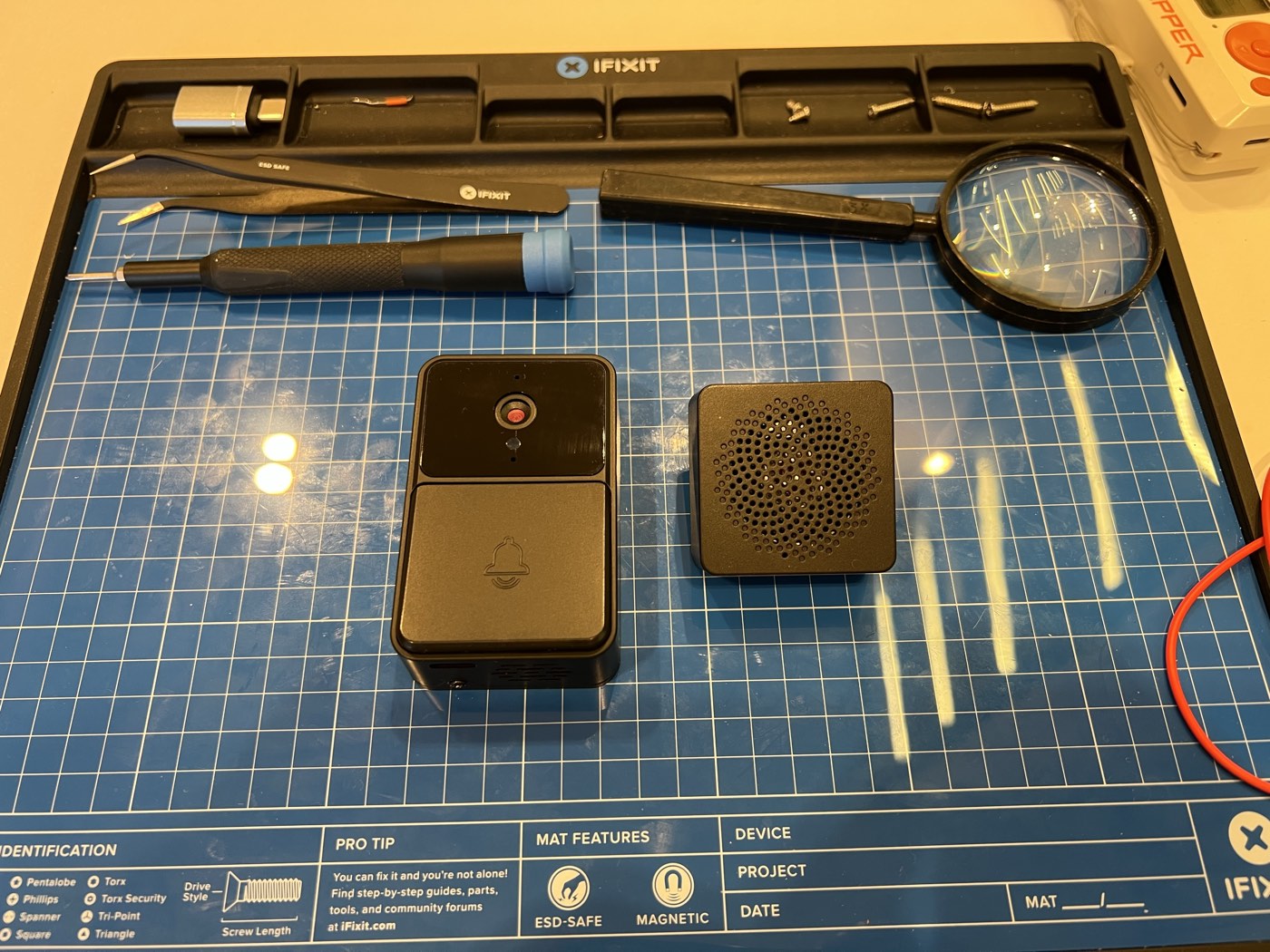
The doorbell and its sub-GHz indoor receiver, before I opened anything up.
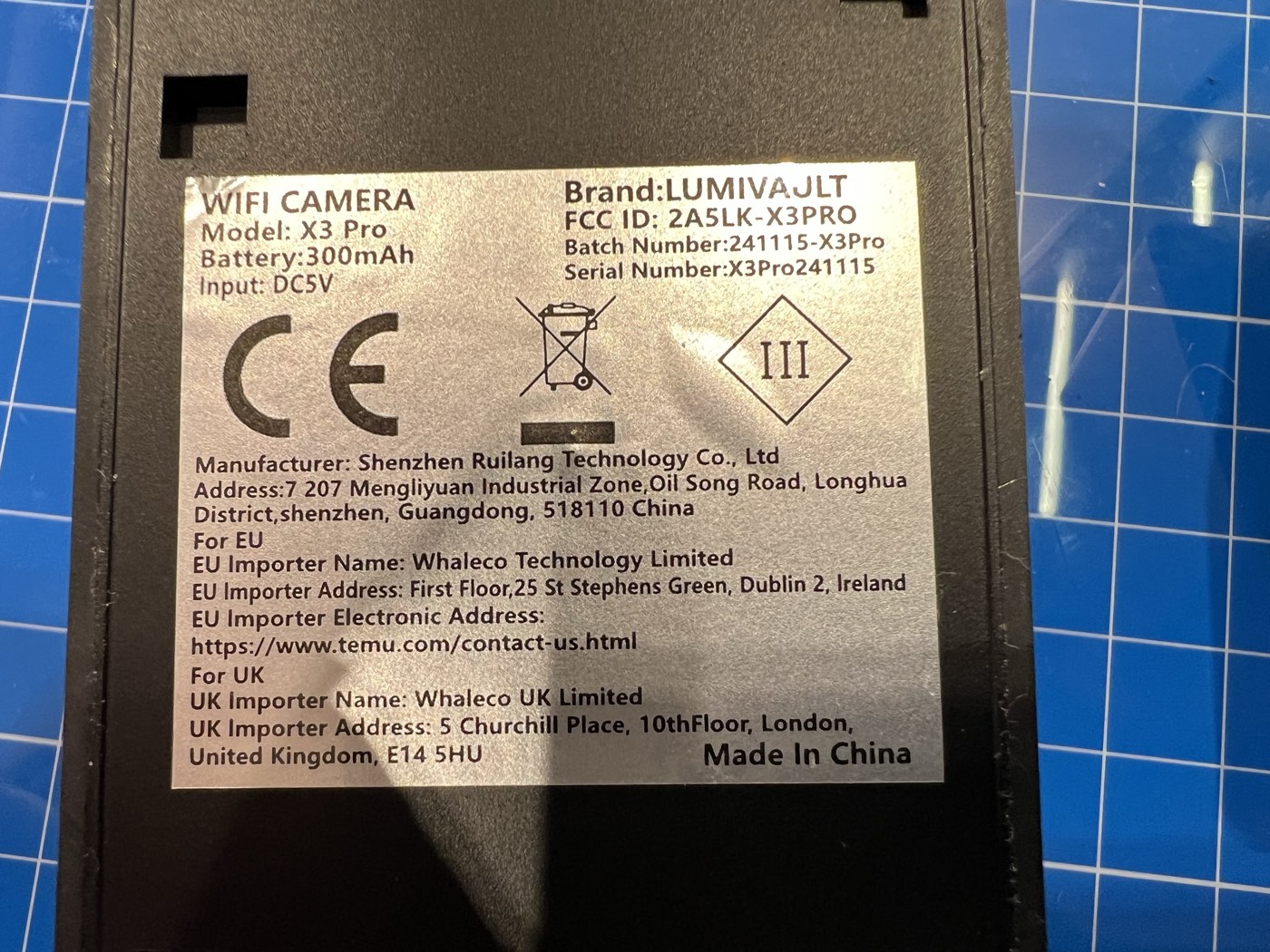
Back of the unit.
The label is more interesting than the box. The hardware OEM is Shenzhen Ruilang Technology Co., Ltd, not Naxclow and not whatever brand the seller printed on the listing. FCC ID 2A5LK-X3PRO, approved in March 2024 for 2.4 GHz WiFi plus 433.91 MHz sub-GHz. Ruilang’s grantee code 2A5LK has at least seven WiFi-camera filings under it. One of them is the A9 model that intx82 reverse-engineered as the V720 mini camera. Same factory, fleet of WiFi cameras under different model codes, all pointed at Naxclow’s backend out of the box. The EU and UK importer-of-record on the label is Whaleco, Temu’s corporate arms in those jurisdictions.
Open it up and the chip count is low. One MCU does almost everything: a Beken BK7252N, a cheap WiFi-plus-audio combo. JTAG and UART headers sit on the front of the board. UART is unusually laid out for a debug header: TX and RX paired together as a small pair of pads, GND off on the edge, no VCC pad. I probed TX during boot, saw voltage moving in a way that looked like serial chatter, and the rest of the day was downhill from there.
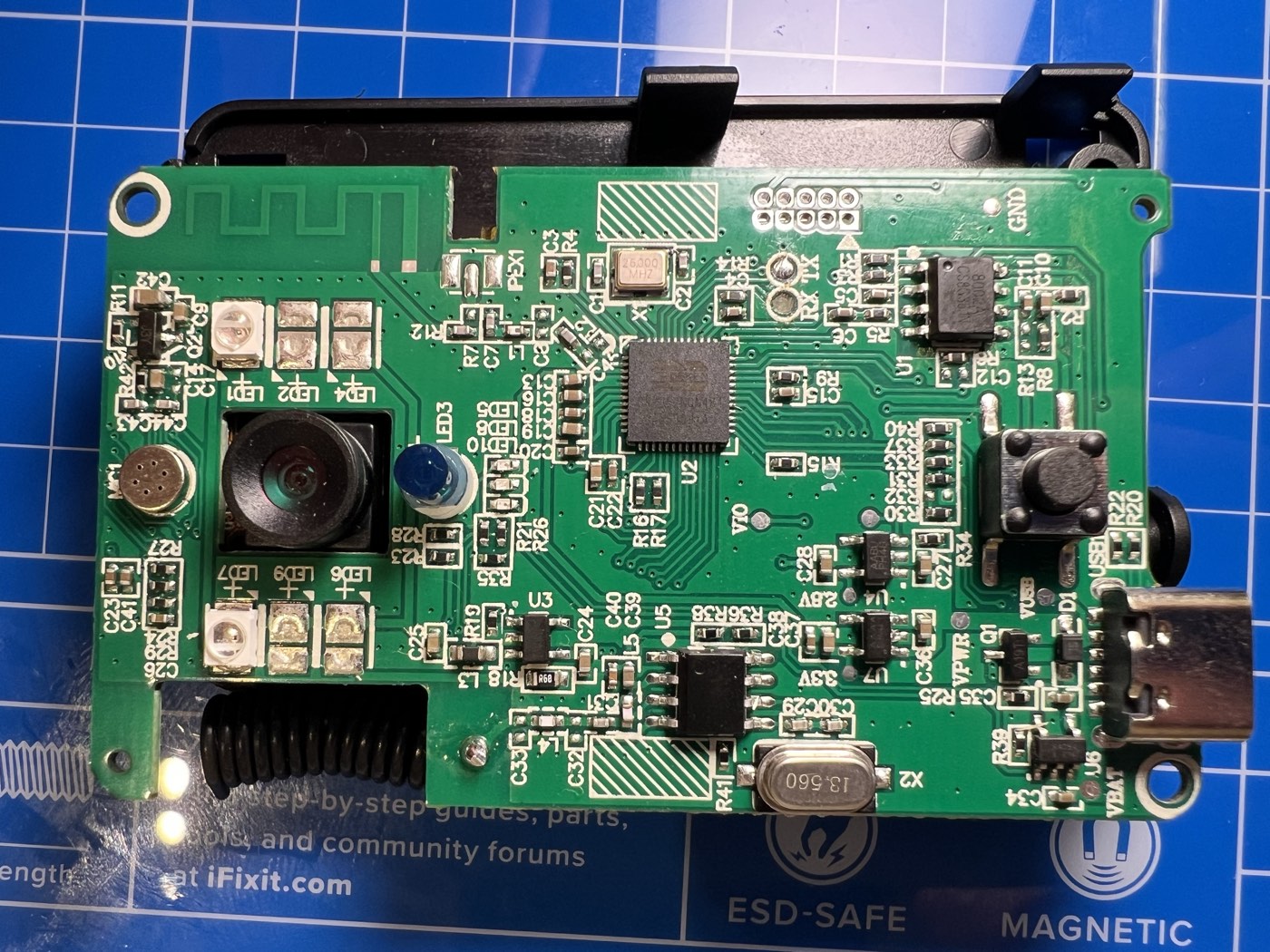
Front of the PCB: camera, IR LEDs for night vision, microphone, USB-C port, ring button.
UART is 115200 8N1. The sub-GHz link is Princeton-encoded 24-bit OOK on 433.91 MHz, replayable with anything that emits OOK at that frequency. WiFi runs RT-Thread 3.1.0 plus the Beken SDK. None of this is exotic. All of it leaks information freely.
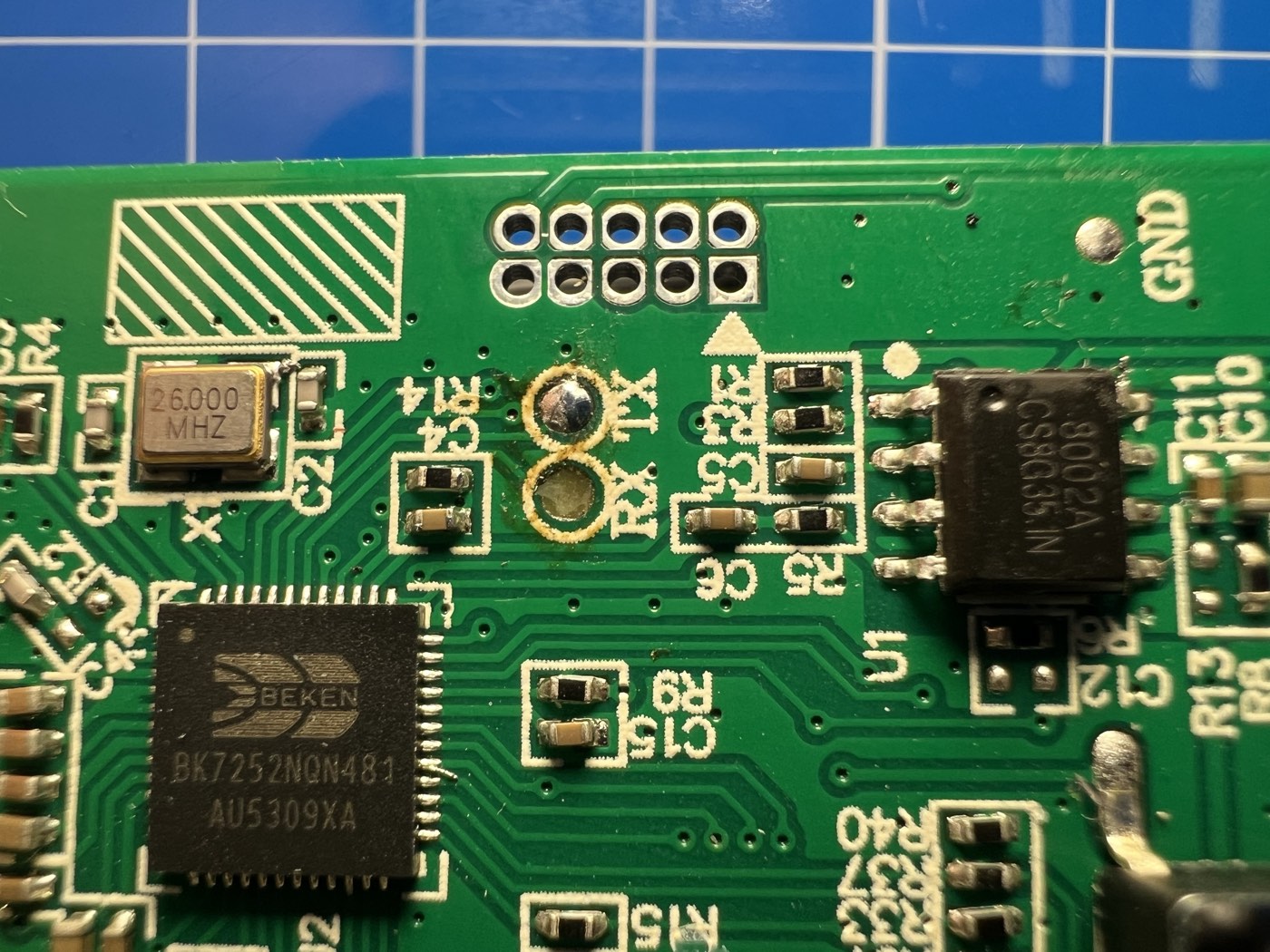
Close-up of the BK7252N: unpopulated JTAG header, UART pads, audio amp.
Press the button and three things happen at once:
- a sub-GHz pulse goes out to the indoor receiver, which rings inside the house
- the doorbell sends an HTTP request to Naxclow’s backend, which pushes a notification to the owner’s phone
- if the owner taps “answer”, the device and the app set up a peer-to-peer call for two-way audio and video
The sub-GHz leg is replayable from the sidewalk with a Flipper Zero. I captured the press once and played it back from the device, and the indoor receiver rang as if I had pushed the real button. I did not chase it any further: well-trodden ground, and not what I came for. I focused on the WiFi side: how the button press reaches the phone, and how the call starts.
Phase 1: Reading the Wire#
MITM in the lab, long Wireshark session, single capture from button press to call answer.
The first thing on the wire is the alert. The doorbell hits the backend in plain HTTP, the backend pushes a notification to the owner’s phone, and the call leg starts only after.
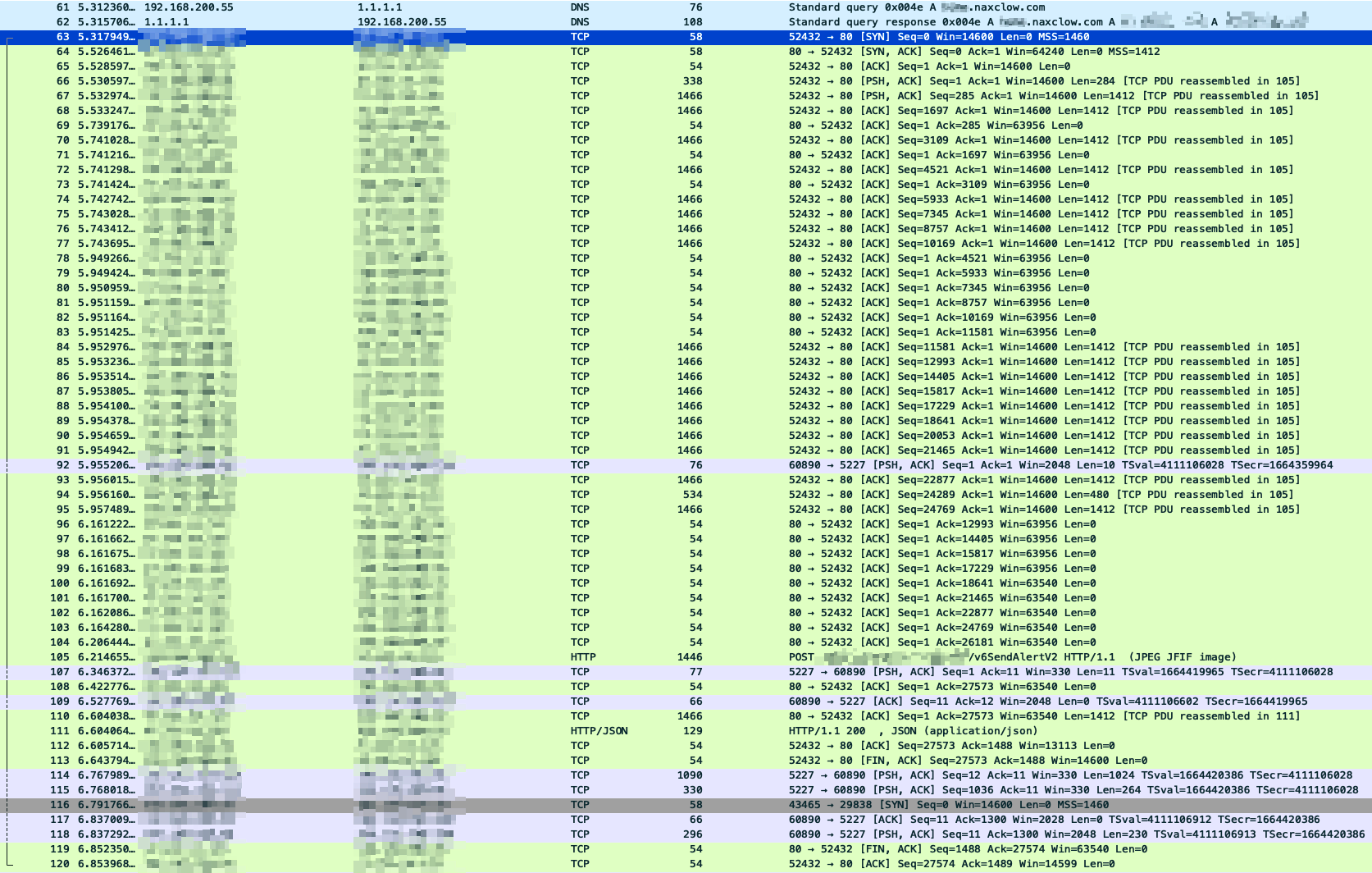
Send-alert request and response, in cleartext. No TLS anywhere on the control plane.
The request is a multipart upload. Three fields stand out: a device ID, a random per-request string, and a token that looks like a signature (fixed-length hex, changes when the parameters change). There is also a JPG attached, which is the snapshot the owner sees in their notification.
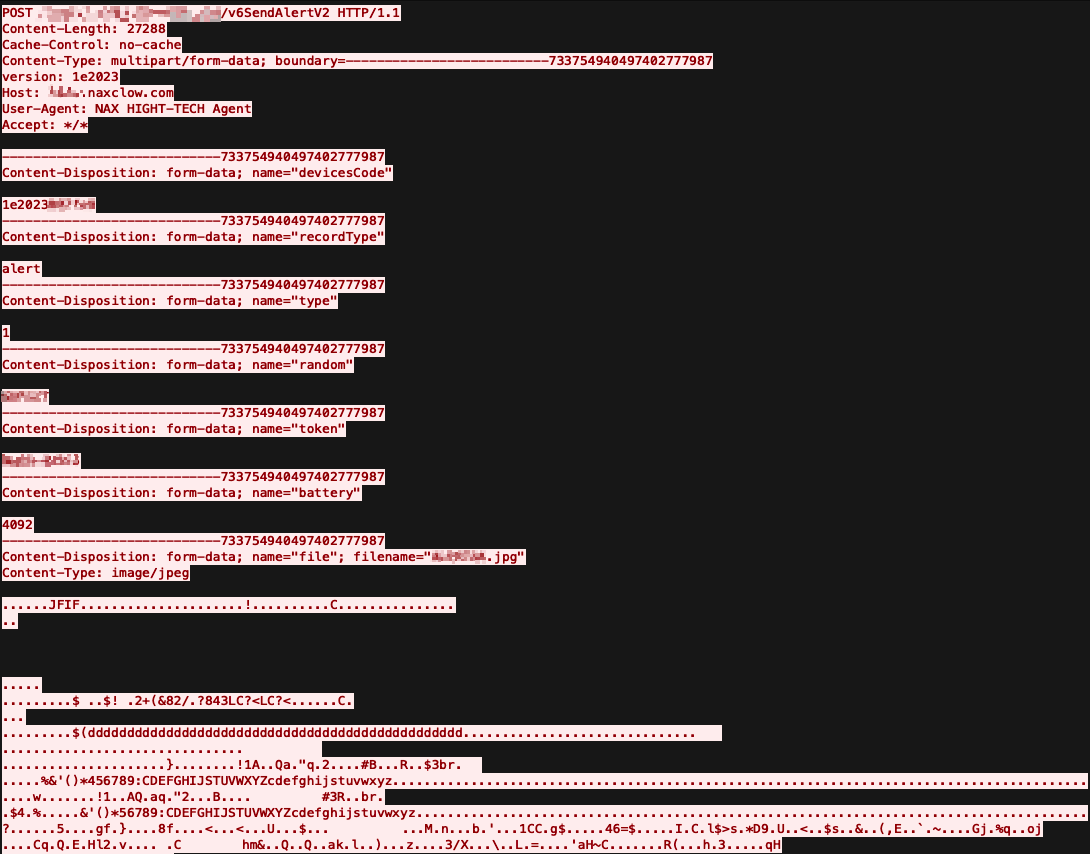
The alert request body. Device ID, nonce-style random field, signature-style token, and a JPG attached as the alert image.
The response is where things get interesting. There is a conf key carrying the host and per-device credentials needed for the P2P call that follows. The credentials are static. They are keyed to the device ID and survive both factory reset and rebinding to a different account. The same value comes back every time.
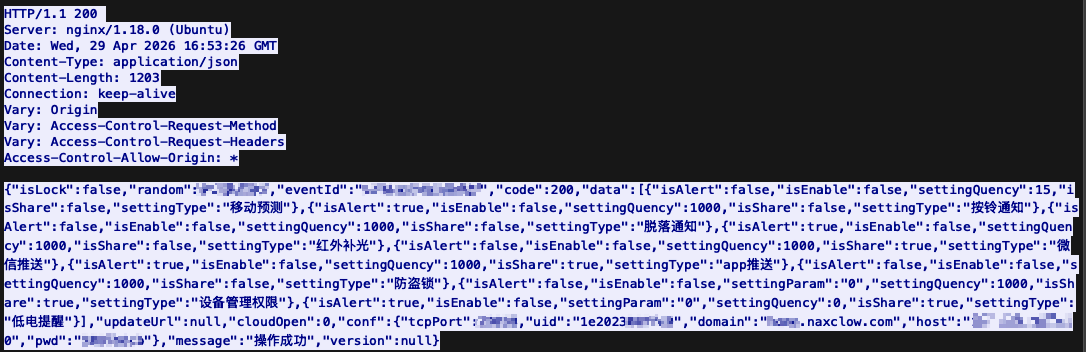
The alert response. The conf block hands back the device’s permanent P2P credentials in plaintext.
Looking across captures, the random and token values change on every request. The device never makes any prior call to fetch either of them, so whatever produces them runs locally on the device itself. The token has the shape of a cryptographic signature: a fixed-length hex string that changes unpredictably across requests. The random field changes alongside it, which suggests it feeds extra entropy into whatever the token is signing.
I tried replaying the request and it worked: the backend generated a new event ID and pushed the notification through. Tampering with any primitive parameter (the random field, say) broke the request, confirming the token does cover them. Replace the JPG body, though, and the alert sails through, with my new image displayed on the owner’s phone. The image is not part of the signature.
After the alert returns, the device opens a TCP connection to the host and port from the conf block. From here on the protocol is binary and looks like a homegrown STUN.
I spent a while reverse-engineering the framing. Each message has a 20-byte fixed header followed by a JSON body. The header packs a length field, a type discriminator (data vs heartbeat), and a session ID. The body carries a command code and the parameters for that command. Once I had the framing, the rest of the exchange read itself.
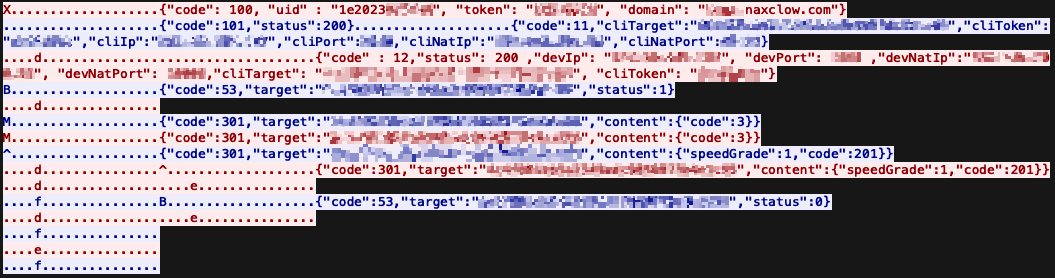
The full signaling session between the device and the server, from authentication through call setup to a status-0 hangup from the app. Custom binary header, JSON body, plaintext credentials throughout.
The first message is authentication. The device sends its device ID, the relay password from conf, and the domain it received in the same response. The domain in the request suggests the same backend serves multiple device families behind a domain selector, not a separate instance per device.
After the registration ACK, the connection sits idle. The alert has already gone out; the device is waiting for the owner to answer on their phone.
The mobile app runs the same auth flow on its own connection. It registers with the relay using its account ID and the account’s persistent token, then issues a call request naming the target device. That is what wakes the device’s connection back up. The relay forwards a message to the device, in the same framing, with everything it needs to reach the calling phone: the account ID of the target client (the mobile app), the matching account-side token, the client’s public and private IP addresses, and the NAT-mapped ports the client probed. Classic STUN-style rendezvous, and the relay’s job is to bridge two authenticated registrations into a peer-to-peer call.
After a handful more configuration parameters get traded, both sides have what they need to NAT-hole-punch directly to each other over UDP, and the call streams peer-to-peer on that channel.
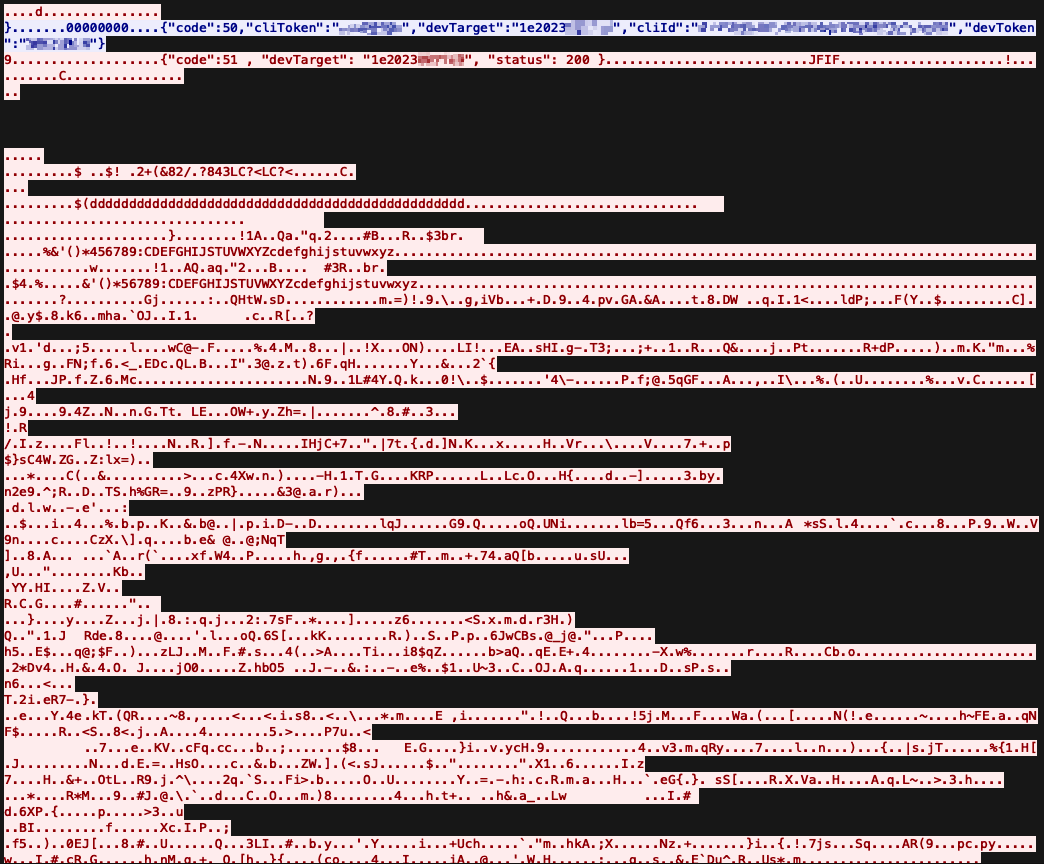
The P2P leg after hole punching: a session setup carrying both sides’ tokens, a status-200 ack, then raw JPEG frames flowing between device and app.
The first message on the P2P leg is a small JSON envelope carrying both cliToken and devToken together: the device’s token and the account’s token in the same packet. The peer acks with status 200. From that point on the channel is mostly raw bytes: JPEG frames with the JFIF magic, plus audio samples in the same stream. Nothing on this leg is encrypted either.
That session setup is itself a credential broadcast. Anyone observing this packet on either end of the hole punch walks away with the long-lived tokens for both the device and the account. Since the media is also unencrypted, anyone on path also gets the live video and audio off the wire.
This was passive recon: read traffic, map protocols. To do anything beyond that I needed to forge requests, and the signing function lives on the device. Which meant the firmware.
Phase 2: What the UART Says Without Being Asked#
The case is already open and the UART pair is already identified. For easy access I soldered fine wires to the TX and RX pads. PCBite probes would have been the cleaner option, but I did not have any on hand.
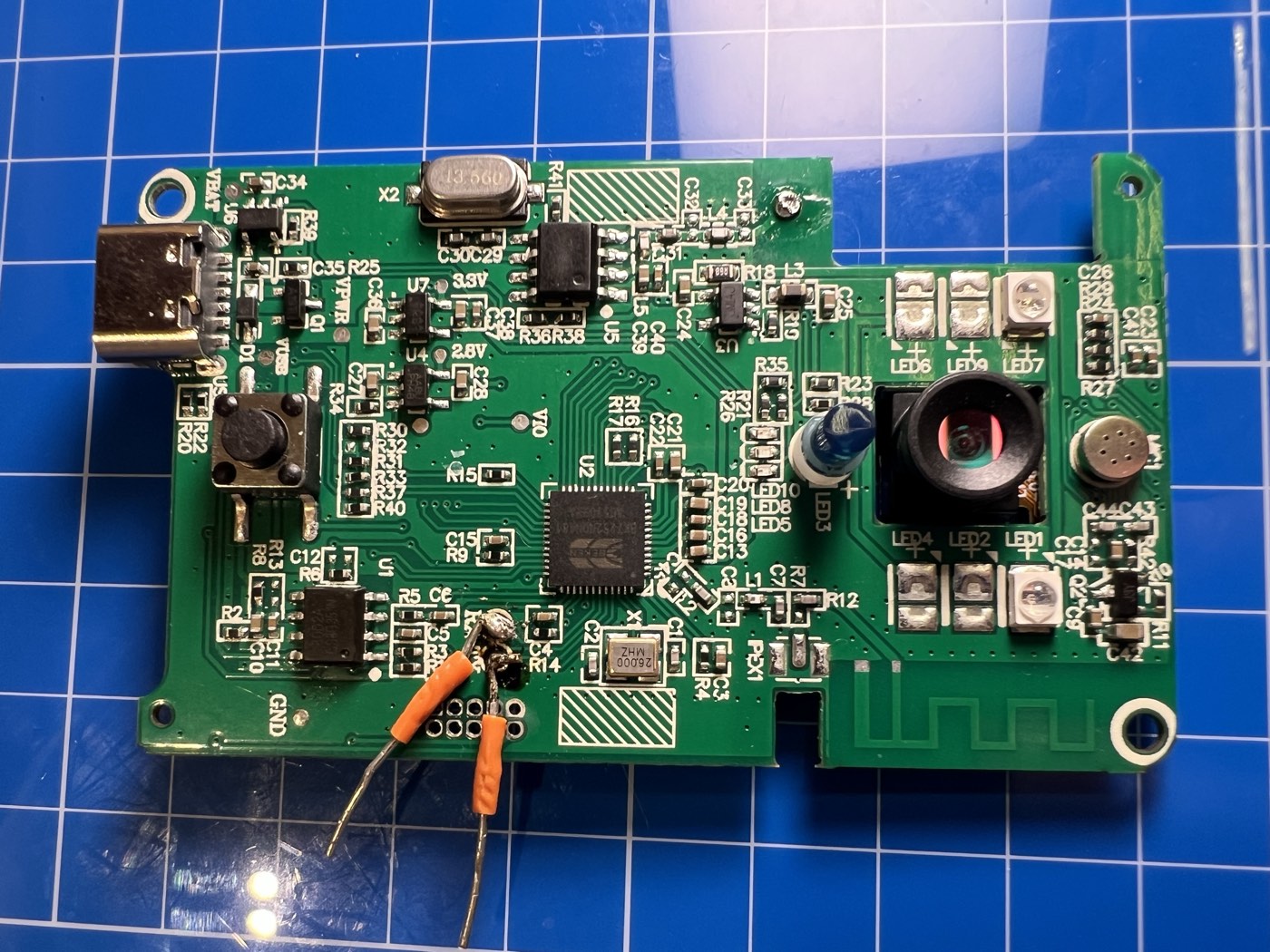
Small wires soldered to the TX and RX pads on the front of the board.
Wires went into a Flipper Zero in UART bridge mode, terminal emulator on the host. The doorbell sleeps deep between events: a press wakes it, runs the full application loop, and sends it back to sleep. Everything below is from one such cycle, starting the moment I pressed the bell button.
The first thing on the wire is the boot banner. Firmware version, an unredacted register dump, the RT-Thread copyright block, and an early OTA initialization failure:
BK7252N_1.0.14
REG:cpsr        spsr        r13         r14
SVC:0x000000D3              0xA4AAB8CC  0x22CA0058
IRQ:0x000000D2  0x00000010  0x227AA88D  0x48C9A634
...
[I/FAL] Fal(V0.4.0)success
[E/OTA] (rt_ota_init:105) Initialize failed! The download partition(download) not found.
[E/OTA] (rt_ota_init:115) RT-Thread OTA package(V0.2.8-beken-1133282d-20220604) initialize failed(-2).

go os_addr(0x10000)..........

 \ | /
- RT -     Thread Operating System
 / | \     3.1.0 build Jun 30 2025
 2006 - 2018 Copyright by rt-thread team
Three findings before the OS has even finished booting. Production firmware prints a debug-mode register dump on each run. The OTA module fails to initialize because the download partition is missing, and the device has no over-the-air update path. The build is RT-Thread 3.1.0, dated June 2025, on the Beken SDK 3.0.76.
Wait for WiFi association and the device prints the SSID, the PSK, and the pairwise and group keys it derives during the four-way handshake:
_wifi_easyjoin: ssid:<my SSID> bssid:00:00:00:00:00:00
key = <my PSK>
...
WPA: TK <32 hex chars>
...
WPA: GTK <32 hex chars>
Anyone with UART access on this device walks away with the home network’s name, password, and active session keys. UART access on a doorbell is not a high bar either: the device hangs on the front of the house by design, so physical access amounts to a screwdriver and a few quiet minutes. That is a whole-network compromise from a single doorbell.
Once the device has an IP it makes its first HTTP call. This is the same alert request from Phase 1, and the firmware prints the response inline. The values from the conf key show up here too, with two of the labels misplaced:
[SOC_connectSockerDevice -237] Debug :CONNECT IP=<backend ip>  PORT = 80
...
[cjson_api_for_device_config_pic_stun:1054] server port <port>
 server pwd <stun ip>
 server host <static device password>
 domain <redacted>.naxclow.com
The “server pwd” line is actually the relay host’s IP. The “server host” line is the device’s static relay password. The values are right; the labels are not. Either way, they are all on the wire.
Then the STUN protocol opens up. The device mirrors the full TCP exchange with the relay to UART, in JSON, both directions:
[start_stun_talk:78] CONNECT IP=<stun ip>  PORT = <port>
...
[rtc_serviceRegisDevice -267] Debug :reg: {"code": 100, "uid" : "1e2023XXXXXX", "token": "<static password>", "domain": "<redacted>.naxclow.com"}
[rtc_serviceRegisDevice -283] Debug :reg: {"code":101,"status":200}
[rtc_serviceRegisDevice -290] The server success to register the device
That first frame is the same one I described in Phase 1: the device authenticates to the relay with its UID, its static relay password, and the domain selector. The firmware prints it to UART verbatim on every wake, with no redaction.
Right after the registration ack, the call leg starts. The same console shows the peer descriptor coming back from the server, plus the hole-punch result:
[rtc_rtthService:1018] recv = ({"code":11,"cliTarget":"<account id>","cliToken":"<account token>","cliIp":"<caller public ip>","cliPort":1948,...
[obj_serverInforExchange -387] Debug : ({"code":12,"status":200,"devIp":"<our public ip>","devPort":1954,"devNatIp":"<our private ip>","devNatPort":10006,...})
[obj_prePeneTest -419] cliip(<caller public ip>) cliport(1948) natip(<caller private ip>) natport(58849)
[obj_prePeneTest -419] pierce through success
Account ID, account-side token, public IP, private IP, NAT-mapped port, all unredacted. The doorbell only ever talks to its bound owner, so the values above are the owner’s. A UART-attached doorbell exposes the bound account along with the device’s own identity.
The end of the call shows up on the same channel:
[rtc_rtthService:1018] recv = ({"code":53,"target":"<account id>","status":0})
Everything above is from passive observation. Nothing typed at the prompt. The device broadcasts its firmware version, its OTA state, the home network credentials, the entire STUN protocol, and every credential needed to drive that protocol, to anyone with a serial cable on a header it shipped with.
Phase 3: Asking the Shell for Firmware#
I pressed enter and the device answered with msh />. That is RT-Thread’s shell, fully interactive. help printed a list long enough to read like a menu:
msh />help
RT-Thread shell commands:
...
device_code       - device_code
write_device_code - write_device_code
dont_sleep        - dont_sleep
pm_level          - pm_level 1
...
printenv          - Print all envrionment variables.
setenv            - Set an envrionment variable.
saveenv           - Save all envrionment variables to flash.
...
ping              - ping network host
ls                - List information about the FILEs.
cat               - Concatenate FILE(s)
fal               - FAL (Flash Abstraction Layer) operate.
wifi              - wifi command
...
A few of those stand out as obvious targets. device_code reads as a getter for the device’s identity, and the output is generous:
msh />device_code
[get_my_mac_devicecode:40] 1e2023XXXXXX 1

my device name 1e2023XXXXXX
[get_my_mac_devicecode:40] 1e2023YYYYYY 1

my device mac  1e2023YYYYYY
sercret <hardcoded salt> batch 1e2023
[Flash]EasyFlash V3.0.4 already initialize.
doorbell m7 X9 dymic chip_five all local start wakeup:17 b 37 g 0 x 30326531 cam 808465202
[Flash]EasyFlash V3.0.4 already initialize.
confirm status 1
Three things in there worth flagging. The “device name” is the MAC-style UID I saw on the wire in Phase 1, in the 1e2023XXXXXX format. The “device mac” looks like a separate hardware MAC, sharing the same 1e2023 batch prefix. And the “sercret” line, typo and all, hands me a string the firmware is treating as a secret.
Yes, “sercret”. With an extra “r”. A misspelled label on a debug command, printing a plaintext credential, on production hardware. No notes.
What the firmware does with that string is not yet clear, but a labelled secret printed in cleartext to a debug command is worth holding onto. The write_device_code command sitting one line above device_code in the help menu is exactly what it sounds like: a runtime path to rewrite the on-flash identity, no auth required.
The shell also has printenv to read back the EasyFlash environment, plus cd, ls, cat against whatever the firmware mounts as its filesystem partition, and setenv / saveenv to write back to flash. None of those got me to firmware extraction directly. The one that did was fal, the Flash Abstraction Layer, with subcommands for probe, read, write, and erase.
fal probe with no argument prints the partition table:
msh />fal probe
[I/FAL] ==================== FAL partition table ====================
[I/FAL] | name       | flash_dev        |   offset   |    length  |
[I/FAL] -------------------------------------------------------------
[I/FAL] | bootloader | beken_onchip_crc | 0x00000000 | 0x0000f000 |
[I/FAL] | app        | beken_onchip_crc | 0x00010000 | 0x00114000 |
[I/FAL] | filesystem | beken_onchip     | 0x00125000 | 0x000d1000 |
[I/FAL] | param1     | beken_onchip     | 0x001fd000 | 0x00002000 |
[I/FAL] | netinfo    | beken_onchip     | 0x001ff000 | 0x00001000 |
[I/FAL] =============================================================
Five partitions on the on-die 2 MB flash: bootloader, app, filesystem, param1, netinfo. There is no download slot, which is exactly what rt_ota_init was complaining about at boot. The chip’s 2 MB is used end to end, with no spare space to carve a download slot out of without reflashing.
Selecting a partition is fal probe <name>. After that, fal read <offset> <size> dumps bytes from the selected partition to the console as a labelled hex view:
msh />fal probe app
Probed a flash partition | app | flash_dev: beken_onchip_crc | offset: 65536 | len: 1130496 |.
msh />fal read 0x0 0x40
Read data success. Start from 0x00000000, size is 64. The data is:
Offset (h) 00 01 02 03 04 05 06 07 08 09 0A 0B 0C 0D 0E 0F
[00000000] 0E 00 00 EA 14 F0 9F E5 14 F0 9F E5 14 F0 9F E5 ................
[00000010] 14 F0 9F E5 14 F0 9F E5 14 F0 9F E5 14 F0 9F E5 ................
[00000020] C0 06 01 00 40 07 01 00 E0 06 01 00 00 07 01 00 ....@...........
[00000030] 20 07 01 00 60 07 01 00 80 07 01 00 EF BE AD DE  ...`...........
One bounded read primitive over UART, pointing at every partition that holds anything interesting: app code at 0x10000 (1.13 MB), bootloader at 0x00000 (60 KB), filesystem in between. With this, the rest of the dump is mechanical.
I wrote a small Python driver in a Jupyter notebook. It iterates the address range of the selected partition in 16 KB chunks, calls fal read over UART for each chunk, parses the hex dumps, and writes the bytes out to a binary file. That was the easy part.
The complication was sleep. Even when actively in use, the device drops back into deep sleep after a short idle window, and fal read over 115200 baud is too slow to outrun it. The shell exposes dont_sleep and pm_level, both of which sound like the right primitives, but I could not get either of them to keep the device awake during a dump in any combination I tried. So the dumper handles sleep instead of preventing it: detect when the device has gone to sleep mid-read, pause, prompt me to press the physical button, wait for the prompt to come back, re-probe the partition, and resume reading from the last successful offset.
This is the part of the writeup where Show, Don’t Tell starts to matter. It was 2 AM. I had a Jupyter notebook spinning, a doorbell sitting on my desk, my finger periodically jabbing the ring button to keep the firmware dump alive between sleep windows, and the cat staring at me from across the room as if to ask whether this counted as work. A few hours and several hundred button presses later I had a complete dump of every partition I cared about.
I never had to glitch the chip or pull it off the board. The device handed me its firmware over a header it shipped with, because the shell let me ask. The dumper notebook stays with me.
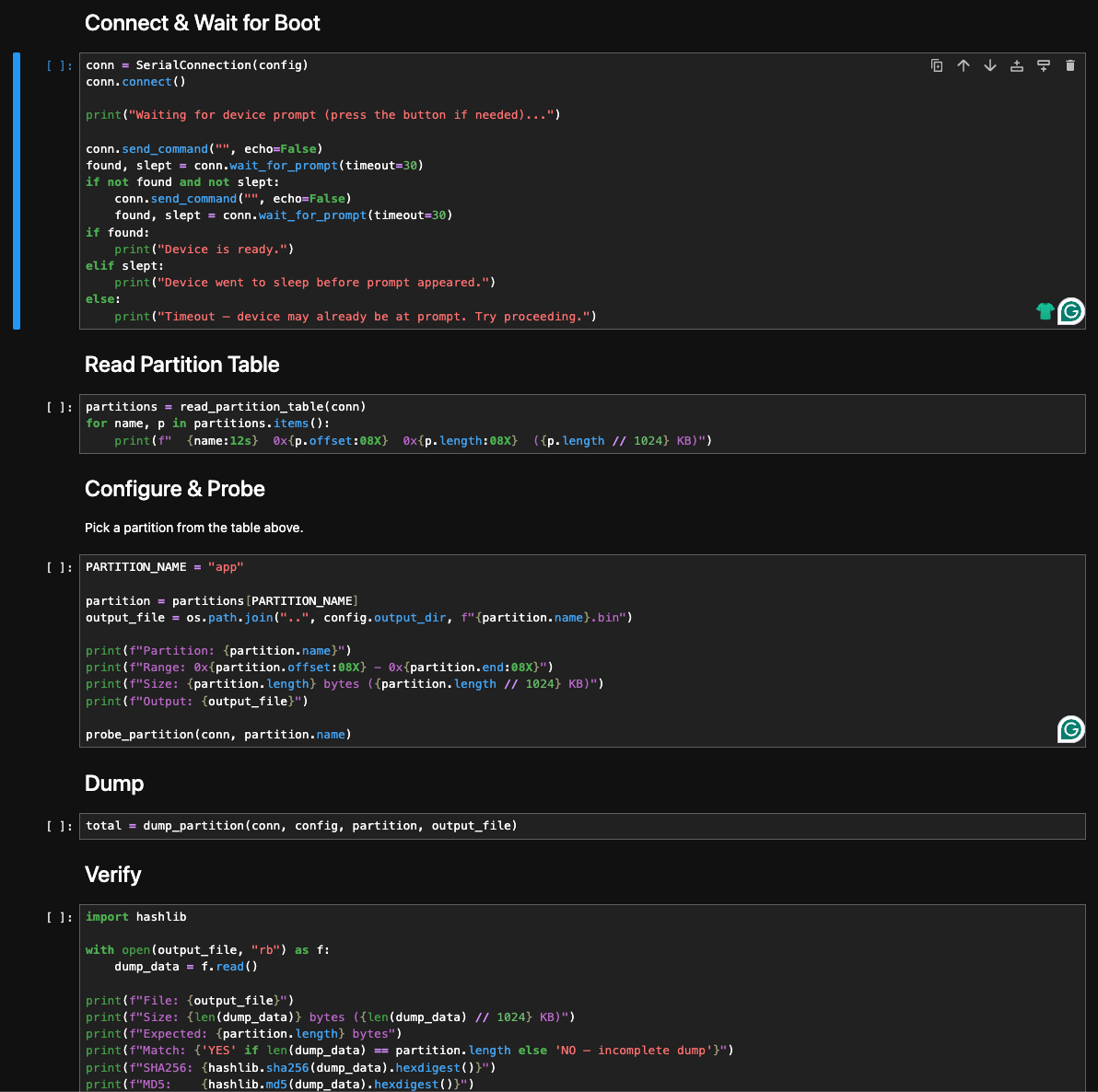
Five cells: connect and wait for the msh /> prompt, read the partition table, probe the target partition, run the chunked dump with sleep-recovery, then hash and verify.
The verify cell hashes the dumped file and checks the byte count against what fal probe reported. Both line up, so the bytes on disk are the bytes the device sent.
The bootloader is not entirely toothless. Strings in the loader reference image-verification logic that runs at boot, with messages along the lines of “App verify failed! Need to recovery factory firmware”. So it does check images on load, although whether the check is cryptographic or a CRC would take a separate pass I have not done.
The OTA failure from the boot banner gets more interesting once you read the strings around it. The runtime error was rt_ota_init: Initialize failed! The download partition(download) not found.. Strings in the binary show that the OTA module itself is statically present, with formatters like OTA Write: [%s] %d%% and guards like Can not upgrade bootloader partition!. The code can write a new image. What it cannot do on this device is find a partition slot named download to write into, so the OTA path never starts.
The “firmware version” the X Smart Home app shows for the device is 1e2023. That is the MAC prefix and the batch tag from the device itself, not a real version string. Combined with the missing download partition, the most reasonable read is that there is no OTA pipeline on this platform at all. The app’s “you are running the latest firmware” message is technically true: no firmware update will reach this hardware in the field.
From there I had a long Ghidra session ahead of me. The backend endpoints I had seen on the wire were all sitting in the binary as plain string literals, but the code around them took time to untangle. Everything in the phases that follow came out of that session.
Phase 4: The Aha Moment Where the Signature Was Not a Signature#
Every signed request runs through the same routine. It produces the token parameter from Phase 1. The shape, with constants and parameter names generic:
- Collect the parameters going into the request (including
random, generated locally on the device). - Add one more entry:
secret=<S>, whereSis the alphanumeric string the firmware prints next to “sercret” in thedevice_codeshell output (Phase 3). Same value on every device of this model. - Order the entries alphabetically by key.
- Concatenate them into a
key=val&key=val&...string. - SHA1 that string.
- Truncate the digest to a fixed length and ship it on the wire as
token=<...>. Thesecretentry never appears on the request itself. The server holds the same constant baked in, re-adds it on receipt, and recomputes.
A few things wrong.
The “secret” is not a secret. The first time I saw it I assumed the value would be device-specific, since a labelled secret next to a per-device shell command is a reasonable place to keep one. The second unit’s firmware had the exact same string baked in. It ships in every firmware image, identical across every device of this model. Pull one device, dump the flash, recover the value once, and now I can sign requests for any device on the platform. Or skip the dump entirely and ask UART nicely: the device_code shell command from Phase 3 already prints it next to “sercret”. The server side has no per-device key the client doesn’t also have, and the protocol carries no challenge for the device to answer. Wire-protocol identity with V720 strongly suggests the same construction in use across the platform family.
The random parameter that comes with every signed request looks like a nonce. It is not. The device generates it locally (a six-character uppercase alphabetic string) and drops it into the parameters that get hashed. The server never tracks it. At verification time the server takes whatever parameters the client sent, including whatever value the client claimed for random, re-adds secret=<S>, hashes, and compares. If the hash matches, accept. The server keeps no record of values it has seen before, so there is no replay protection in the protocol at all. The random is decorative. I can pin it to a constant, increment it, or fill it with the letter A six times, and the server treats every variation the same.
Put the two together: SHA1 with a static suffix is not authentication. There is no key on the server side that the client does not also have. This is integrity hashing in disguise. It stops a casual inspector reading the pcap, nothing more.
Once I had the function I built a tiny client in Python that reproduces it. I will not be sharing it. With the salt and the algorithm, I can mint a request to any signed endpoint on the platform, fill in any parameters I want, append a correctly-computed signature, and the server accepts it. From here on, every attack in this writeup runs through that client.
This was the first turning point. From this moment on, “the doorbell” and “anyone with my Python client” are interchangeable to the platform.
Phase 5: The Tokens Never Rotate#
Phase 1 already showed two interesting fields in the call setup: devToken (the device’s relay password) and cliToken (the account’s relay password). Both ride the wire in cleartext on every call. The naming made me assume short-lived session tokens.
They are not. I checked for rotation. There is none I can find:
- factory reset preserves
devTokenbyte for byte - rebinding the device to a different account preserves it again
- the firmware has no code path that asks the backend for a new password
The token is stored server-side, keyed to the device ID. The firmware fetches it via the alert response’s conf block on each cycle, so factory reset and rebind never reach the authoritative copy. Whatever creates the server record in the first place is opaque from the outside, but once it is there, nothing the owner does shakes it loose. The account’s token behaves the same way: provisioned once at signup, stuck to the account from then on.
A devToken is enough to register on the relay as that doorbell. A cliToken is enough to register as that user’s app. Neither value is bound to a session, replay-protected, or short-lived.
The exposure window for cliToken is wider than “calls the owner answered”, too. The mobile app registers with the relay the moment the push notification arrives, not when the owner taps “answer”. So the account-side token hits the wire on every alert the app receives, picked up or ignored. Anyone who can drive a target’s phone to ring (Phase 7) can drive its app’s registration along with it.
Phase 9 shows how to get a device’s token without being on the wire at all.
Phase 6: Devices Have Predictable Identifiers#
The device ID is a MAC-like value in the format 1e2023XXXXXX:
1eis a locally administered MAC prefix.2023is the batch tag, hardcoded in the firmware.- The trailing six hex digits are an incrementing counter.
The device_code shell output in Phase 3 prints batch 1e2023 directly, so every unit running this firmware advertises the same prefix. The space worth enumerating is the trailing six hex characters, and the counter is sequential. The IDs are not salted or scoped per account in any way I could observe.
There is also a backend endpoint whose job is to mint new device codes for new manufacturing runs. It takes a batch prefix as a parameter and returns a fresh sequential ID under that batch. It is signed (Phase 4), with an account identifier among the signed parameters, but the mint itself does not bind the new ID to that account. The device does not appear in the caller’s listing until they run the separate confirm-then-bind chain (Phase 8). One signed POST under any prefix I name returns the next free ID for that batch. The number it hands back is the current high-water mark of the counter, before I have enumerated a single thing.
Phase 7: Alerts Take a Device ID and Nothing Else#
A “doorbell pressed” alert into any owner’s phone takes one signed POST and the target’s device ID. The endpoint accepts whatever signed body lands at it, with no auth on the request beyond the signature itself. Phase 1 already showed the request is replayable and that the attached image is forwarded untouched. Phase 4 broke the signature. Phase 6 broke the ID. Put together, they collapse into a single primitive: anyone on the open Internet can make any doorbell on the platform ring its owner’s phone, with whatever image I attached.
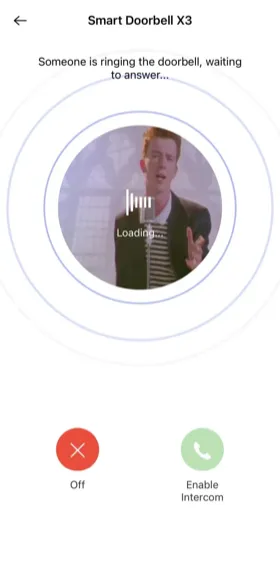
I will let you guess what was in the JPG body the first time I tested this primitive against my own phone. You are correct. The X Smart Home app rendered it under “Smart Doorbell X3”, with the cheerful “incoming call” overlay. From the app’s point of view, that was who was at my door.
The endpoint never asks the device anything. The backend has no way to distinguish a real doorbell from a forged signed request with a valid ID.
The firmware exposes more than one alert endpoint. They differ only in how they carry the snapshot: multipart with a JPEG, a legacy GET path with no image, base64 inline. They all accept the same hash construction. Patching one in isolation just moves the bug.
Phase 8: Silent Takeover#
The X Smart Home onboarding flow uses two HTTP endpoints in sequence. The first puts a device into “available for binding” state on the backend. The second binds the device to a specific account. Both are plain string literals in the firmware. Both use the hardcoded signing salt from Phase 4. The bind step takes an account ID as the new owner, so the attacker needs a free account on the platform to be the bindee, nothing more.
The onboarding flow assumes the device hits these endpoints itself, just after a factory reset, before it has a binding. The backend does not enforce that assumption. A signed POST to the first endpoint resets the binding state for any device on the platform. A signed POST to the second endpoint, with the attacker’s account ID as the new owner, completes the bind. The previous owner is silently dropped.
Behaviour after the bind, observed live with two of my own devices and two test accounts:
- the device disappears from the original owner’s app the moment the bind returns
- it stays online on the same WiFi, with no factory reset on its end
- the device gives no signal that anything happened
- to the owner the device looks fine, except the app no longer lists it
The chain is:
- Enumerate device IDs in the fleet, or mint one under a known batch (Phase 6).
- For each ID, fire the confirm-then-bind sequence with your account ID as the new owner.
- Receive every doorbell event, every call, every snapshot, from a stranger’s front door.
Recovery is where it gets ugly. The owner’s path back is a hardware factory reset followed by re-onboarding through the app. That rebinds the device to them. But the same chain that took it away still works the next minute: the attacker fires the confirm-then-bind sequence again and reclaims it. A factory reset does not change anything the backend uses to decide ownership.
Phase 9: The Aha Moment Where I Became the Doorbell#
The second turning point. Phase 8 lets an attacker move a device sideways to their own account. Phase 9 lets them sit inside an active call on a device they never touched.
Phase 5 showed that the call-setup tokens never rotate, but lifting one off the wire still requires being on path or holding backend logs. The firmware points at a much cleaner primitive.
Phase 1 already showed that the alert response carries the signaling config in its conf block: relay host, relay port, the device’s uid, and its persistent relay password. Lifting credentials that way works, but sending an alert rings the owner’s phone, which is the noisy path. The platform also exposes a second signed endpoint that returns the same config without delivering any alert. It takes a device ID and a signed token, hands back the relay host, port, uid, and password for that ID, and never touches the owner’s app. There is no check that the caller is the device, or the device’s current owner, or anyone in particular.
So with a forged signed request and any target’s device ID, the platform hands back that device’s persistent relay password directly. One POST, one response. The owner’s app never wakes up.
Once I have the password, the impersonation is mechanical:
- Open a connection to the relay returned by the lookup.
- Send the platform’s registration header and the registration JSON, with the target’s device ID as
uidand the leaked password astoken. The relay treats my socket as the real device from then on. - Send a forged “doorbell pressed” alert to the target’s account. Their phone rings.
- Wait for the owner to tap “answer”. The tap does not place a call to the device side. It tells the relay the app is ready and hands over the app’s connection details. The relay passes those to whichever socket is registered as the device, which is mine. The real doorbell is never paged.
- From there my client does what the real device would: dial the owner’s app over UDP, run NAT-discovery and hole-punch, then stream attacker-chosen MJPEG video back. The peer-to-peer leg is always device-to-app, never the reverse.
Step 3 has a useful side effect for the attacker. As Phase 5 noted, the owner’s app registers with the relay the moment the push notification arrives, not when the owner taps “answer”. An impersonation call the owner ignores, where the phone rings but never gets picked up, still puts the owner’s cliToken on the wire.
There is a hardware-only variant of the same attack that delights me. Phase 3 surfaced a write_device_code command in the UART shell that overwrites the device’s on-flash identity, no auth required. With UART access to a doorbell I own, I write a target’s device ID into my own unit, press the button, and the stock firmware does the rest. It sends a signed alert as the target, receives the target’s pwd back in the conf block, and registers on the relay as the target. The attacker writes nothing. The firmware already speaks the protocol fluently; it just operates on a borrowed identity. From the platform’s point of view, my hardware is now their doorbell.
The owner’s phone shows a normal call from their normal door. The video they see is whatever I send: a still, a recorded clip, a frame loop, a prepared spoof. The video channel runs one-way from device to app, so nothing the phone does constrains what the attacker pushes. The audio leg is two-way: the owner speaks and listens through their phone as they normally would; the attacker speaks and listens through the impersonation client. The relay shuttles audio between the two endpoints, treating the attacker’s client as if it were the actual doorbell. The real doorbell never sees any of this. There is no signal on the phone or on the device that the camera at the other end is not the camera at the other end.
This is meaningfully different from Phase 8. Takeover reassigns the device permanently and the owner stops getting notifications. Impersonation leaves the device exactly where it was. The owner keeps getting notifications. They just no longer talk to their actual front door when they pick up.
I have a working impersonation client. I am not releasing it.
The Wall of Shame#
Putting the chain together. What an attacker armed with an HTTP library can actually do, with the prerequisites for each spelled out below:
TAKEOVER: silently steal any doorbell on the platform#
Two signed POSTs from any account. The first resets the binding state for the target device, the second assigns it to the attacker. The original owner’s app drops the device the moment the bind returns. The device itself stays online and has no idea anything happened. Combined with sequential IDs and a forgeable signature, this is fleet-wide.
WIFI THEFT: lift home network credentials through a debug port#
UART access on the doorbell prints the home SSID, the PSK, and the WPA pairwise and group keys to the debug console during boot. The doorbell is mounted outside the house. The requirements amount to a screwdriver and a few quiet minutes. One foothold turns into the whole LAN.
CALL HIJACKING: live impersonate a doorbell on someone else’s call#
One signed request returns the target device’s persistent relay password. Register on the relay as that doorbell, force the target’s phone to ring with a forged alert, and answer the call in the device’s place with attacker-chosen video and live two-way audio. The real doorbell stays online. The owner never realises the camera at the other end is not the camera at the other end.
Findings, by severity#
The full list, in one place. Severities are my own assessment.
[Critical] Silent takeover via confirm-then-bind chain. Two signed POSTs from any account on the platform: one resets the binding state, the second assigns the device to the attacker’s account. The original owner’s app drops the device the moment the bind returns. The device itself stays online and silent throughout. Combined with sequential IDs and a forgeable signature, this is fleet-wide.
[Critical] One-shot credential lift via the signaling-config endpoint. Any signed request with a target device ID returns that device’s persistent relay password directly in the response body. The attacker does not need to be on the wire or to read backend logs. This is what makes Phase 9 a one-step attack instead of a two-step one.
[Critical] Live device impersonation. With the leaked per-device relay password and a forged signed alert, I can register on the relay as someone else’s doorbell, force their phone to ring, and answer the call in their place with attacker-chosen video and live two-way audio. The original device stays online and the owner keeps getting notifications. They just no longer see their actual front door when they pick up.
[Critical] Persistent per-device password never rotates. The password is stored server-side, keyed to the device ID. Factory reset, rebinding to a different account, and time alone all leave it byte-identical. Once an attacker has lifted it (one signed request, see above), even discarding the hardware only helps once the server stops handing the password out. Re-onboarding rebinds the device, but the credential the attacker holds keeps working.
[High] Persistent plaintext credentials in the call setup. The call-setup protocol forwards account ID, public and private IPs, NAT mappings, and the persistent per-device and per-account relay passwords between peers and the backend on every call, unencrypted. These are not session tokens; they are long-lived passwords reused until rotated, and rotation does not appear to happen. The mobile app registers with the relay on push-notification arrival, not on call answer, so the account-side password hits the wire on every alert the app receives, picked up or ignored.
[High] Unencrypted P2P call media. The video stream from the doorbell to the app and the two-way audio between them flow over the peer-to-peer leg in plaintext. Anyone on path between either party and the relay, or between the two peers after the hole punch, can lift the live feed off the wire.
[High] WiFi credentials leak via UART log. During WiFi association the firmware prints the home network’s SSID, the PSK, and the derived WPA pairwise and group keys to the debug console. UART access on a doorbell mounted outside the house amounts to a screwdriver and a few quiet minutes, which turns a single-device foothold into a whole-network compromise.
[High] Sequential device identifiers. The 12-hex device ID is 1e2023 plus an incrementing counter. The whole fleet is enumerable.
[High] Unauthenticated minting of new device codes. A signed request with a known batch prefix and an account identifier returns a fresh sequential device ID under that batch. The mint itself does not bind the new ID to the calling account; that takes the separate confirm-then-bind chain. Beyond the obvious abuse of growing the namespace at will, every mint reveals the high-water mark of the batch counter to whoever asked, which makes targeted enumeration trivial.
[High] Unauthenticated alert delivery. The alert endpoint takes a device ID, an image, and a signed token. That is the entire input; the request itself carries no authentication beyond the signature. Anyone on the open Internet who can sign a request can ring any owner’s phone with an attacker-supplied image.
[Medium] Hardcoded signing salt. The “signature” on every control-plane request is a truncated SHA1 over alphabetically-ordered parameters plus a fixed alphanumeric string baked into the firmware. Once recovered, requests are forgeable for any device. Wire-protocol identity with the V720 sibling app suggests the same construction spans the platform family.
[Medium] Multiple alert endpoints, one auth scheme. Multipart with JPEG, legacy GET-style without an image, and base64-in-multipart all accept the same hash format. Patching one without the others does nothing.
[Medium] Plain HTTP control plane on a server that already serves TLS. The same nginx, on the same hostname, accepts HTTPS on port 443 with a valid certificate and serves the same API endpoints identically. The firmware was written to use plain HTTP regardless. This is a configuration choice, not a server limitation.
[Medium] Verbose UART debug shell on production hardware. The shipped firmware drops to an interactive console on a labelled UART header, with help, status, and memory commands available to anyone with a serial adapter. The same shell mirrors the full STUN protocol exchange, the device’s persistent relay password, and the bound owner’s account ID to the console on every wake.
[Medium] Arbitrary memory read via debug commands. Sufficient to dump the whole firmware image without specialized tooling. Bootstraps every other firmware-side finding.
[Low] OTA broken on shipped firmware. The OTA partition is missing on this build, so the device cannot pull updates over the air. Any vendor fix would have to ship as a manufacturing-time reflash on future units, with no path to existing fielded hardware.
[Low / informational] Bootloader has image verification at load. Strings in the bootloader reference verification logic with messages like “App verify failed!”. Whether the check is cryptographic or a CRC was not determined in this pass. Worth knowing if a future researcher tries to inject a modified firmware.
Impact#
For a single owner this is bad in two distinct ways. Takeover lets anyone on the open Internet move your doorbell to their account silently. Every event from your front door rings their phone instead of yours from that moment on. Impersonation lets them sit in the middle of any call you do answer, replacing the camera feed with whatever they want and holding a live conversation as the impostor visitor. The first steals the device. The second steals individual conversations. Both happen with no on-device indication: the device keeps lighting up, the app keeps saying “online”, and you find out either by realising the doorbell has gone quiet (takeover) or by realising the person at the door is not actually at your door (impersonation).
Recovery is harder than it looks. A factory reset rebinds the device to the original owner, but the per-device password is stored server-side, keyed to the device ID, and does not rotate when the device resets or rebinds. An attacker who lifted it once can register on the relay as the device for as long as that record exists on the server. The only deterministic fix at the device level is to throw the hardware away, and even that only helps once the server stops handing the password out.
If the attacker has physical access (a low bar for hardware mounted outside a house), the take expands. UART access lifts the home network’s WiFi credentials in plaintext during boot, turning a doorbell foothold into an entry point onto the home LAN. The same access also enables a hardware-only variant of the impersonation attack: the write_device_code shell command rewrites the on-flash identity, and the stock firmware handles the protocol from there.
For the fleet it is worse. The IDs are enumerable and mintable, the alert path is forgeable, the per-device credential is one signed request away, and the takeover is a two-endpoint chain that any signed-up account can drive. A motivated attacker can sweep the address space and either harvest credentials and home-network maps in bulk, or pick targets one by one.
There is also no easy patching story on the vendor side. The OTA partition is missing on this firmware version, so even if Naxclow shipped a fixed build tomorrow, it has no path to the devices already in the field.
The chain has multiple independent links: the firmware, the onboarding endpoints, the credential-lift endpoint, the predictable ID scheme. Each one needs its own fix. Closing any one in isolation just shifts the attack to a different rung.
Disclosure#
- 2026-04-01 Started testing on my own devices in an isolated lab, part-time.
- 2026-04-29 Disclosure report sent through the working email addresses (the contact-finding story is in the intro) and the X Smart Home in-app feedback form. No reply.
- 2026-05-06 Publication, with sensitive specifics withheld, one week after the notification.
- 2026-06-11 CISA published advisory ICSA-26-162-02 with seven CVEs.
Naxclow is operated by Guangzhou Qiangui IoT Technology Co., Ltd., so the disclosure is with the right organisation regardless of which brand the device shipped under.
If they reach out, I will update this blog with their response and any fixes that ship. I am happy to share the full findings, including the redacted parts, through a proper coordination channel.
Takeaways#
If you own one of these devices#
VLAN your IoT. I cannot say that loudly enough. Treat the doorbell as a hostile network host on your own LAN, put it on a guest segment that cannot reach anything you care about, and accept that the vendor probably cannot fix any of this even if they wanted to. The OTA path is broken on the firmware I tested, so even a willing fix has no road to the unit already glued to your wall.
A few practical signals worth watching for:
- the doorbell goes quiet for no reason: that is now a thing worth checking
- a call you answer feels off in any way: trust the feeling
- the X Smart Home app shows the device as offline more often than your network outage explains: same story
If it makes you nervous, throw it away. The next $12 doorbell on the same Temu listing is probably running the same firmware on the same backend.
If you build these devices#
A cheap MCU does not absolve the backend of identity. A “signature” built from a string that ships in every firmware image is not authentication. Onboarding endpoints that take a new bind without checking a current ownership claim are fleet-wide takeover primitives. Mirroring persistent credentials between peers on every call setup turns the wire into a credential broadcast, and a per-device password that never rotates makes that broadcast permanent. If your nginx already terminates TLS, point your firmware at it. And if you own the platform, please rotate the credential after a factory reset.
If you do this kind of assessment#
Cheap MCU-based devices look intimidating because there is no Linux shell waiting for you and no obvious foothold above the silicon. They are not. The same UART that makes them easy to develop on is right there on the production board, and any debug command that reads memory will, given enough patience and enough button presses at 2 AM, hand you the firmware. Spend the afternoon with a serial adapter before you reach for anything fancier.